
Sometimes We Just Can’t Reply!
To streamline message management, I designed the “Remind Me Later” feature for Messenger. It’s a simple, essential tool that lets users return to messages when they’re ready, helping users stay on top of conversations without feeling overwhelmed.

A long message pops up...
You see the message, but right now you’re caught up in something important or just don’t feel like replying. You want to get back to it later, but you know there’s a good chance you’ll forget. The ‘Remind Me Later’ feature gives you a gentle nudge, so you can return when you’re ready and it actually fits your schedule.
Role: UX/UI Designer
Duration: 2 weeks
Tools: Figma, FigJam, Miro
Why We Forget to Reply
To better understand user needs, I conducted interviews with 5 messenger app users, including professionals, students, and casual users. The interviews focused on communication habits, challenges with replying to long messages, and expectations for a reminder feature.
Key Insights:


Notifications get buried when users switch between work, social, and personal tasks. They forget to come back to messages later.
Some messages need more focus. Users often postpone replying until they can give proper attention.
Users expressed that they often forget messages they intend to reply to, highlighting the need for reminder tools to help reduce cognitive load.
Based on user interviews and observations, I created two personas to represent typical users and their needs


Created a diagram to map user interactions, ensuring key steps and decisions were covered for the prototype

Visualizing the layout, key interactions, and reminder flow to present a clear view of the feature in action.


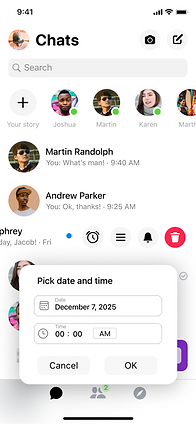
When the user swipes left on a conversation, several options appear, including a new clock icon to set a reminder.
Inbox

User can choose a custom reminder time.

Confirmation appears after setting the reminder

After tapping the clock icon, the user sees preset reminder times and can also choose a custom time.

In the inbox view, messages with an active reminder display an icon next to them, so the user can see the reminder without opening settings.
Chat settings now include a Reminders section, letting users manage when and how they get notified about messages.


In the Reminders section, the user can enable or disable reminders for this chat.
Once enabled, they can set a default reminder time, deciding how long after receiving a message they want to be reminded if they haven’t replied.
Users can also choose whether reminders apply to unread messages only or to all messages, including those already read.
The Active Reminder / Edit Reminder area shows any current reminder, allowing the user to edit or delete it.
After defining the feature’s flow and placement, I designed high-fidelity frames to ensure the new feature fit seamlessly into Messenger’s interface.


Usability test
I conducted remote usability testing with 5 participants. Each user received the prototype link and a short explanation of the reminder feature.
Scenario:
You get a message requiring a detailed reply. Use the “Remind Me Later” feature to plan your response and test how easy it is to modify or cancel the reminder.
User Feedback:
Some users mentioned they would like to schedule reminders further in advance
for example, when they expect to have the details needed to reply only in a few weeks.
A few users expressed the need for a quicker way to remove or undo a reminder immediately after setting it, without having to navigate through settings.
Iterated on the design to resolve key user pain points and enhance overall flow.

Based on the feedback, I introduced a calendar option, giving users the flexibility to set reminders for specific dates even several weeks ahead.

I improved the flow by adding an Undo option that appears immediately after setting a reminder, allowing users to quickly cancel it without navigating to settings.

Final Design
The Remind Me Later feature introduces a calmer, more intentional way to manage conversations, helping users stay organized without feeling pressured to reply immediately. It turns quick message exchanges into a more mindful experience, giving people the freedom to respond when they’re ready.
This project demonstrates how a small, thoughtful addition can make messaging feel less stressful and more human-centered, improving overall communication flow. It highlights the impact of design that adapts to users’ real-life needs, not just the app’s functionality.
